
If you’ve ever lost track of a potential customer, forgotten to follow up with a lead, or struggled to remember details from a previous conversation, you’ve experienced the exact problems that CRM software solves. Let’s dive into what CRM is, why it matters, and how it can transform your business.
What is CRM?
CRM stands for Customer Relationship Management. It’s software that helps businesses manage all their interactions with current and potential customers in one organized place.
Think of it as a digital command center for your customer relationships. Instead of scattered information across emails, spreadsheets, sticky notes, and team members’ memories, everything lives in one system that everyone can access.
A CRM tracks contact information, communication history, sales activities, customer preferences, and much more. It ensures no lead falls through the cracks and every customer interaction is informed by complete context.
Core Features of CRM Software
Contact Management
Store unlimited customer and prospect information including names, phone numbers, emails, company details, and custom fields specific to your business. Access complete profiles with full interaction history in seconds.
Lead Management
Capture leads from multiple sources automatically, assign them to the right team members, and track their progress through your sales pipeline. Modern systems like a comprehensive sales platform pull leads from websites, social media, ads, and phone calls into one unified database.
Communication Tracking
Record every phone call, email, meeting, and message. When a team member is on vacation or a customer calls a different representative, anyone can pick up the conversation without missing a beat.
Sales Pipeline Visualization
See exactly where every deal stands in your sales process. Know which prospects are close to buying, which need nurturing, and where your team should focus their energy.
Task and Activity Management
Set reminders for follow-ups, schedule calls, assign tasks to team members, and get notifications when important actions are due. Never forget to follow up again.
Reporting and Analytics
Generate reports showing sales performance, conversion rates, team productivity, and revenue forecasts. Make data-driven decisions instead of relying on gut feelings.
Automation
Automate repetitive tasks like sending follow-up emails, assigning leads, updating contact information, and moving deals through your pipeline. Free your team to focus on selling.
Mobile Access
Access your CRM from anywhere using mobile apps. Update information, make calls, and check customer details whether you’re in the office, on the road, or working from home.
Integration Capabilities
Connect your CRM with email, phone systems, WhatsApp, marketing tools, and other business software to create a seamless workflow.
Types of CRM Systems
Operational CRM
Focuses on automating and streamlining customer-facing processes like sales, marketing, and customer service. Best for businesses that want to improve efficiency and handle more customers with the same team size.
Best for: Sales teams, customer service departments, businesses with high lead volume
Analytical CRM
Emphasizes data analysis and customer insights. These systems help you understand customer behavior, identify trends, and make strategic decisions based on comprehensive data.
Best for: Marketing teams, business strategists, companies focused on data-driven growth
Collaborative CRM
Designed to facilitate information sharing between different departments—sales, marketing, customer service, and technical support. Ensures everyone has a complete view of each customer.
Best for: Larger organizations with multiple departments, businesses with complex customer journeys
Strategic CRM
Takes a long-term approach to customer relationships, focusing on understanding customer needs and building lasting relationships rather than just closing quick sales.
Best for: B2B companies, premium service providers, businesses with long sales cycles
Most modern CRMs combine elements from all these types, offering a comprehensive platform that handles operations, provides analytics, enables collaboration, and supports strategic growth.
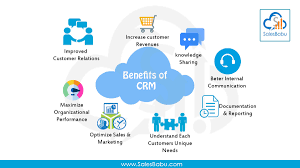
Key Benefits of Using CRM Software
1. Better Customer Relationships
When you know a customer’s full history—past purchases, preferences, previous conversations, and concerns—you can provide personalized, thoughtful service that builds loyalty and trust.
2. Increased Sales
CRM helps sales teams work smarter by prioritizing hot leads, automating follow-ups, and providing instant access to customer information. Sales reps spend more time selling and less time searching for information.
3. Improved Team Collaboration
Everyone sees the same information in real-time. When a colleague is handling a customer, you know exactly what’s been discussed and promised. No more duplicate efforts or conflicting messages.
4. Enhanced Productivity
Automation handles routine tasks, reminders ensure nothing gets forgotten, and organized information saves hours of searching. Teams accomplish more with the same resources.
5. Better Customer Retention
Proactive follow-ups, personalized communication, and quick problem resolution keep customers happy and coming back. It costs far less to retain existing customers than acquire new ones.
6. Data-Driven Decision Making
Access to comprehensive analytics helps you identify what’s working, spot problems early, forecast revenue accurately, and allocate resources effectively.
7. Scalability
As your business grows, a CRM grows with you. Handle 100 customers or 100,000 without losing track of relationships or compromising service quality.
8. Reduced Response Times
Quick access to customer information means faster responses to inquiries. Whether a customer emails, calls, or messages on WhatsApp, your team has immediate context.
Who Needs a CRM?
Small Businesses
Even with a small team, managing customer relationships manually gets messy fast. A CRM keeps you organized from day one and supports growth without adding administrative burden.
Sales Teams
Any team making outbound calls, managing leads, or tracking deals benefits enormously. Features like 1-click dialing and call recording make sales processes faster and more efficient.
Real Estate Agencies
Property inquiries come from multiple sources—websites, portals, walk-ins, referrals. A CRM captures all leads automatically, tracks property preferences, schedules viewings, and maintains communication until closing.
Educational Institutions
From initial inquiry to enrollment and beyond, education businesses need to nurture relationships over months. CRM manages the entire student journey efficiently.
Healthcare Practices
Patient appointment scheduling, follow-up reminders, treatment history, and communication management all become simpler with CRM systems.
E-commerce Businesses
Track customer purchase history, segment audiences for targeted marketing, manage customer service inquiries, and identify opportunities for upselling and cross-selling.
Service Providers
Whether you’re running an insurance agency, consulting firm, or any service business, CRM helps manage client relationships, track project progress, and ensure consistent communication.
How to Choose the Right CRM
1. Assess Your Needs
List the specific problems you’re trying to solve. Do you need better lead tracking? More efficient calling? Automated follow-ups? Multi-channel communication? Clear needs guide the right choice.
2. Consider Ease of Use
The best CRM is the one your team actually uses. Complex systems with steep learning curves often go unused. Look for intuitive interfaces that require minimal training.
3. Check Integration Options
Your CRM should work with your existing tools—email, phone systems, marketing platforms, accounting software. Seamless integration prevents data silos and duplicate work.
4. Evaluate Mobile Capabilities
If your team works remotely or travels frequently, robust mobile apps are essential. They should offer most desktop features, not just basic viewing capabilities.
5. Review Automation Features
The more routine tasks the CRM handles automatically, the more time your team saves. Evaluate automation capabilities for lead assignment, follow-ups, data entry, and reporting.
6. Understand Pricing Structure
Look beyond the monthly cost. Consider setup fees, per-user pricing, additional feature costs, and whether pricing scales with your growth. Hidden costs can make “affordable” systems expensive.
7. Test Customer Support
When issues arise, responsive support makes all the difference. Check support availability, response times, and whether help comes from knowledgeable humans or just automated responses.
8. Start with a Trial
Most CRM platforms offer free trials. Use this time to test with real data and actual workflows. Involve your team in testing—they’ll use it daily, so their input matters.
Implementing CRM Successfully
Get Leadership Buy-In
CRM adoption succeeds when leadership actively supports and uses the system. If managers bypass the CRM, teams will too.
Start Clean
Import accurate, up-to-date data. Resist the temptation to dump years of messy spreadsheets into your new CRM without cleaning first.
Train Thoroughly
Proper training prevents frustration and ensures your team leverages the CRM’s full capabilities. Provide hands-on training, create quick-reference guides, and offer ongoing support.
Customize Thoughtfully
Configure the CRM to match your actual sales process, not a generic template. But avoid over-customization that creates unnecessary complexity.
Monitor Adoption
Track who’s using the system and how. Address resistance early through additional training, process adjustments, or identifying technical issues.
Iterate and Improve
Regularly review what’s working and what isn’t. CRM systems should evolve with your business, not remain static.
Common CRM Mistakes to Avoid
Choosing Based on Features Alone: More features don’t always mean better. Choose based on which features you’ll actually use.
Skipping Data Cleanup: Garbage in, garbage out. Clean data before migration saves headaches later.
Inadequate Training: Assuming software is “intuitive enough” leads to poor adoption and wasted investment.
Over-Complicating Processes: Keep workflows simple and focused on what truly matters to your business.
Ignoring Mobile Needs: If your team works outside the office, mobile capabilities aren’t optional—they’re essential.
The Future is CRM-Powered
Customer expectations continue rising. They want personalized service, quick responses, and seamless experiences across all channels. Meeting these expectations manually is impossible at scale.
A well-implemented CRM transforms how you connect with customers, enabling your team to deliver exceptional experiences consistently. Whether you’re a small business just starting to organize customer information or a growing company looking to scale efficiently, investing in the right CRM pays dividends in increased sales, happier customers, and more productive teams.
Modern platforms offer everything you need in one place—from lead capture and management to calling, automation, and analytics. The question isn’t whether you need a CRM, but which CRM fits your business best.
Take the time to evaluate your needs, test options thoroughly, and choose a system your team will embrace. The right CRM doesn’t just organize information—it becomes the foundation for sustainable, scalable growth.